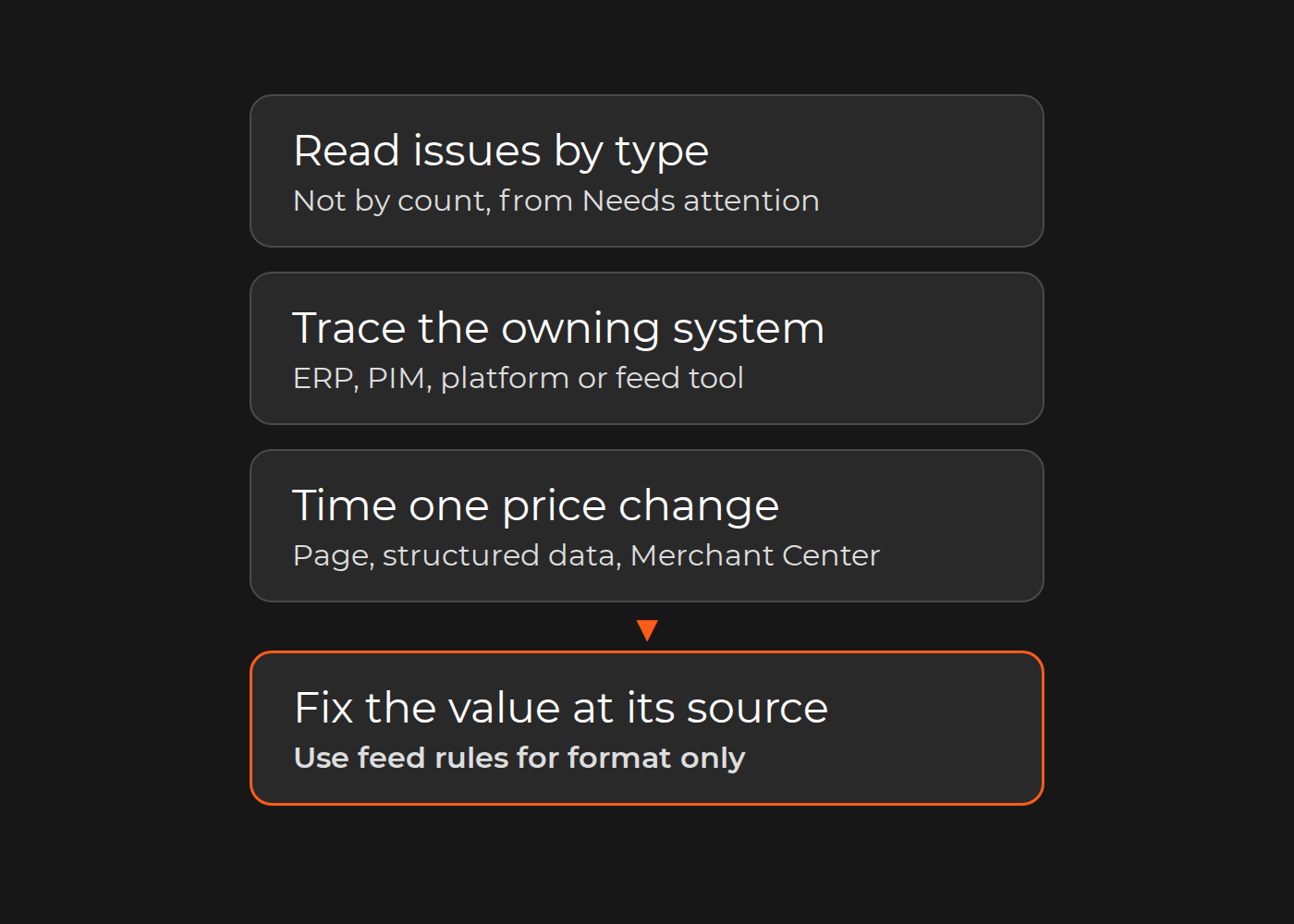
Most Merchant Center disapprovals are data problems that only show up in the channel. Find the system that owns each wrong value and fix it there; use feed rules for formatting only.
Google's help center names three causes of product-level issues: product data that "doesn't match the product information on your online store", data that "doesn't follow the product data specification", and products that "violate our Shopping policy requirements." The first two usually start upstream of Merchant Center:
Identifiers missing or wrong at the source. A GTIN, brand or MPN exists in supplier data or the ERP but never reaches the PIM or the feed, or a placeholder goes out instead.
Price or availability that does not match the landing page, because the feed updates more slowly than the store, or because the page, its structured data and the feed apply different rules.
Attributes mapped wrongly between the platform and the feed.
So fix each value in the system that owns it, use feed rules to change format, and track Merchant Center's diagnostics by issue type. Check the integration method too: Google's developer documentation states that the Content API for Shopping "was sunset on August 18, 2026", and points integrations to the Merchant API.
This guide is for ecommerce and performance-marketing leads running Shopping ads or free listings, together with the catalog owner.
The disapproval triage table
Work through the issues in one table, filled in from Merchant Center's diagnostics and your own systems:
Issue type, as Merchant Center names it.
Affected SKUs, from the downloaded list.
Owning system: where the correct value is created (ERP, PIM, platform or feed tool).
Root cause: why the wrong or missing value reached the channel.
Fix location: where you change something so the value stays right.
Re-check method: how you confirm the fix.
Owner: one named person.
Then run one price and availability sync test: time a genuine, planned price change at the source until the landing page, its structured data and Merchant Center agree.
Worked example (fictional, for illustration only). A retailer has 11,000 products in Merchant Center, and 2,300 of them are limited or disapproved.
Issue type
Affected SKUs
Owning system
Root cause
Fix location
Re-check method
Owner
Missing GTIN
1,500
ERP (supplier GTINs)
The ERP-to-PIM import has no mapping for the GTIN field
ERP-to-PIM mapping, then a backfill
Spot-check 20 SKUs against supplier data; issue count falls after the next upload
PIM owner
Price mismatch
600
Platform (sale-price rules)
Sale prices change hourly; the feed runs nightly
Price updates sent on change, not nightly
Price and availability sync test
Ecommerce developer lead
Attribute format
200
Feed tool
Internal size codes sent instead of the sizes shown on the product page
Size-code mapping rule in the feed tool
Feed preview, then the issue list
Performance-marketing lead
The sync test for the price row: at 10:00 a planned sale-price change goes live on five products in the platform. Product pages and their structured data show the new prices by 10:05; Merchant Center gets them from the nightly feed at 02:00. For as long as 16 hours after each change, those products can be flagged for a mismatch. The fix is to send price and availability changes when they happen, then repeat the test.
Illustrative trace for four common issue types: follow each issue from Merchant Center back through the feed to the system that owns the value, where the fix goes. Typical owners are shown; yours may differ.
Read diagnostics by issue type, not by count
Product issues are listed in the Needs attention tab of the Products page. Google describes three kinds. With warnings, products "will continue to show across Google, however their performance may be limited." With disapprovals, products "stop showing across Google." A preemptive item disapproval "occurs if the price or availability of your products don't match between your product data and product pages."
A total count tells you little. Filter the list by issue, download each issue's affected products as a CSV, and open the Issue Details Page for samples and the stated cause. When the "Prioritized fixes" toggle is on, Google says issues "with little to no impact may not be displayed", so switch it off while you build the full table.
Rank the rows by risk as well as volume, because some issues reach the whole account. On mismatched prices, Google warns: "This may lead to an account suspension." On availability: "Too many products with incorrect availability can lead to account suspension."
Identifiers: GTIN, brand and MPN at the source
Google's product data specification leaves no room for guessing: "Only provide a GTIN if you're sure it is correct," and "If you submit a product with an incorrect GTIN value, your product will be disapproved." The MPN rule reads the same way. A missing GTIN costs reach, and can cost approval: such products "may have limited visibility", and if a product has a GTIN that you don't submit, "the product could be disapproved." Google also asks you not to fill the gap with "internal SKUs or other values specific to your store", and not to send a brand such as "N/A", "Generic", "No brand" or "Does not exist".
That makes identifiers a source problem:
GTINs usually come from suppliers. If they sit in the ERP or supplier files but not in the feed, the gap is a mapping in the ERP-to-PIM or PIM-to-platform import. Fix the mapping and backfill; a feed rule cannot know the right number. Collecting missing identifiers from suppliers for thousands of SKUs is ecommerce data entry work; values that keep getting lost between systems point to the PIM implementation and its import mappings.
Products with identifiers you do not have yet: Google says to "leave the attribute blank" rather than send a wrong value.
identifier_exists = no is for products that truly lack identifiers. Products incorrectly set to no "for which there is evidence that a unique product identifier exists, will receive a warning."
Price and availability mismatches: sync timing and structured data
Google's check is mechanical: "Googlebot routinely crawls your website landing pages and compares the price [price] attribute in your data source with the prices on your landing page or in your structured data markup (if implemented)." The product data specification asks you to match price with "your landing page, structured data, and at checkout", and availability with "your landing page, checkout pages, and structured data".
Most causes Google lists for price mismatches sit upstream:
"Time differences between updates on your website and Merchant Center product data."
Structured data that is wrong, or that keeps a base price or default currency while the page shows a converted one.
Sale timing: the sale price effective date and its time zone.
Prices injected by script: "If data on your website is passed dynamically with JavaScript after the page is loaded, this will trigger an error." Google Search Central's merchant listing guidance likewise recommends putting Product structured data in the initial HTML.
Minimum order quantities, where "the total price for the minimum number of items sold must be submitted."
Automatic item updates are a safety net, not a sync. Merchant Center's automations use landing page data to update price, sale price, availability and condition, and they are "enabled by default". Google is explicit about their limits: they "aren't a replacement for regular updates of your product data", they "may not work for products with frequent price or availability value changes (for example more than once per day)", and Google "may also stop updates if the total number of detected mismatches becomes too large."
Run the sync test by timing a genuine, planned price change on a few products, including one with a scheduled sale price. If the gap between the page and Merchant Center is longer than the interval between your price changes, the fix is a faster or event-driven update, not more manual edits.
Attribute mapping and feed rules: format, not fix
Google describes attribute rules, formerly feed rules, as giving you "the ability to transform your data to match our product data specification requirements." That is where they help: converting units and formats, mapping internal codes to the values shown on the product page, and combining fields into a title. Merchant Center can test draft rules before they apply, so check the preview first. Its automatic fixes, which Google calls "persistent rules", deserve the same care.
Be careful with anything beyond format. A rule that fills a missing GTIN, sets one brand for a whole category or overrides a price changes only the copy Google receives. The source stays wrong, other channels inherit the error, and the next import can break the rule without anyone noticing. A practical test: if the rule supplies a value rather than a format, the fix belongs upstream. Category quality across a large catalog is a separate job; see AI-assisted catalog optimization.
Integration method: feeds, apps and the Merchant API
How data reaches Merchant Center decides how fast a fix arrives: file uploads, platform apps and API integrations each have their own cadence and mapping layer.
The API changed in 2026. Google's developer documentation states that the Content API for Shopping "was sunset on August 18, 2026." From September 1, 2026, requests from clients without an active extension "intermittently fail with an HTTP 410 Gone status code", and Google's timetable lists full decommissioning for "Early 2027", with timing "subject to revision". If your platform app, feed service or custom connector still calls the Content API, updates can fail to arrive, and stale prices and stock then surface as mismatches. Ask the vendor or your developers which API the integration uses.
For fast-changing data, Google's automations page is direct: "If you expect the pricing, availability, and condition of your products to update frequently, you should use the Merchant API to manage product updates."
Keep it clean: publication rules and monitoring
Once the backlog is fixed, stop new gaps at the source:
A publication rule in the PIM or platform. A product goes to the Google channel only with a GTIN or a recorded decision that it has none, a brand from the controlled list, a price and an image. Internal publication blocks are a separate problem, covered in why new products wait weeks.
Change-triggered updates for price and availability, sized to how often they change.
A weekly review by issue type, with the same owners as the triage table, plus a look at the status history in Needs attention after each catalog import or platform release.
Where Dinarys has done this kind of work
On a BigCommerce catalog update across 137,000+ products for an office supplies wholesaler, Dinarys "reviewed, updated, or downloaded data on over 137,000 products". The team updated "product names, SKUs, and images", developed categorization "with the help of AI", and ran "some scripts and workarounds to make the data consistent". The case page makes no Merchant Center claim; it shows the source-side data work that feed fixes depend on.
Exceptions
Custom or handmade products. They often have no GTIN. Google's identifier_exists page uses a custom-made dress and a hand-knitted scarf as examples submitted with identifier_exists set to no. Its unique identifiers page adds that a manufacturer with no official brand can "use your store name as the brand" along with an MPN of its choice. Pick one approach per product type and record it in the PIM.
Multi-country feeds. Prices must be in the target country's currency, and products targeting several countries "may receive different disapprovals or warnings for each country." Give each country its own rows in the triage table.
Marketplaces. If your products reach Google through a marketplace, the listing usually comes from the marketplace's data: correct what you send them.
Policy disapprovals. Google's Shopping ads and listings policies cover prohibited content, prohibited practices, restricted content and site requirements. Most are not data-quality defects: change the product, the listing text or the site to meet the policy, then request a review.
Check your result
Download the current issue list and assign every issue type to an owning system: ERP, PIM, platform, feed tool, or policy.
Fill in the triage table, with one named owner per row.
Time one genuine, planned price change and write down the gap between your landing page and Merchant Center.
If a row's fix location is a feed rule that supplies a value, or the sync gap is longer than the time between your price changes, the source is still wrong.
Clean source data removes the data reasons for a disapproval. It does not decide re-approval, which follows Google's own re-crawl and review, and it does not change policy decisions or ad performance by itself.
FAQ
How long does re-approval take after a price fix?
Google says Googlebot "automatically re-crawls disapproved products over the next few hours or days to recheck the price." Requesting a website check speeds up the review, which Google says can take as long as 12 hours.
Should we rely on automatic item updates?
No. Google says they are "designed to fix sporadic problems" for "a small percentage of your products." If they correct many products every day, your source sync is too slow.
Can we use our internal SKU as the MPN?
Yes, if you are the manufacturer and only seller, or the product is your store brand or private label: Google asks for "a unique identifier number of your choice (for example, your product SKU)". For other brands' products, leave MPN blank rather than send an internal SKU.
Our feed tool shows no errors. Why does Merchant Center?
A feed tool checks format. Merchant Center also compares your data with the landing page and its structured data, so a well-formed price can still be the wrong price.
Your next step
Download this week's issue list, fill in the triage table and run one sync test. If the fixes land in your ERP, PIM or import mappings and your team lacks the capacity, talk to Dinarys about catalog management.
You may share this article
Let professionals meet your challenge
Our certified specialists will find the most optimal solution for your business.