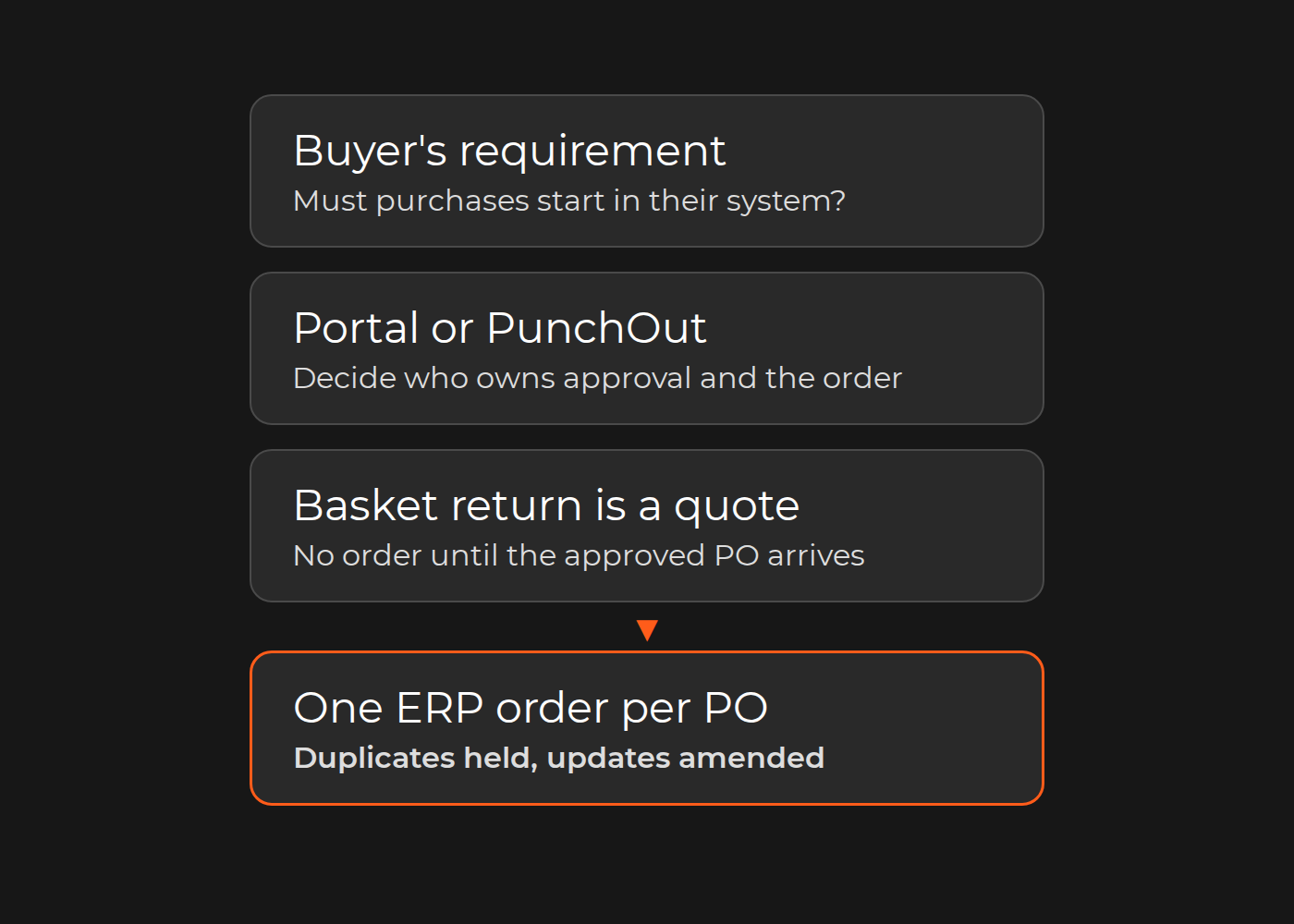
A basket returned to a buyer's procurement system is a quote, not an order. Decide who owns approval and the final order before you choose what to build.
If an enterprise customer requires every purchase to be raised and approved in its own e-procurement system, you need to sell through that system, usually with PunchOut: the buyer starts in their system, shops your catalogue at their contract prices, and the basket goes back to their requisition. Their approval workflow runs there, and you receive an order only when an approved purchase order (PO) arrives. If the customer is willing to order and approve on your site, a B2B portal with its own checkout, account pricing and approval rules is the simpler build, because your checkout creates the order.
In both models your commerce platform presents the contract price during the session and your ERP owns the sales order. What changes is who owns approval, who submits the final order and which message your integration must treat as the order. The cXML Reference Guide states the difference plainly: when the basket is returned, "the supplier has provided a quote for the requested items—the supplier has not yet received a purchase order, so the supplier cannot yet book the order."
This guide is for B2B distributors and manufacturers selling to enterprise procurement teams. It gives you a responsibility matrix, an illustrative trace from basket to ERP order, acceptance tests for the failures that cause duplicate or wrongly priced orders, and a scoping worksheet.
The flow and who owns each handoff
Use this matrix with your sales, ecommerce, ERP and customer-service owners before anyone estimates a connector. Fill the "Inspect" column with a real buyer's answers.
Step
With PunchOut (owner)
With portal checkout (owner)
Inspect
Catalogue entry
The buyer's procurement system opens your site with a setup request that identifies the buying organisation (buyer's procurement admin, your integration)
The buyer logs in to your portal (your ecommerce team)
Which system starts the session, and which buyer identity arrives
Account and price context
Your storefront maps the buying organisation and user to an account, assortment and contract prices (your commerce and sales operations)
Same
Which system is the source of truth for contract prices
Basket return
The basket is posted back to the buyer's requisition: a cXML PunchOutOrderMessage or OCI item fields (your integration)
Not applicable: the basket goes to your checkout
Basket ID, prices, quantities, units, supplier reference per line
Procurement approval
The buyer's approval workflow (buyer's procurement)
Your portal's approval rules, if you build them (buyer's approvers working in your portal)
Who may change the basket once approval has started
Final order
The approved PO is sent from the buyer's system, as a cXML OrderRequest or through another agreed channel (buyer sends, your integration receives)
Your checkout submits the order (your platform)
PO number, PO version, duplicate rule
ERP order and acknowledgement
Your integration creates one ERP sales order and sends an order confirmation (your ERP and integration owner)
Same, triggered by your checkout
Transport-level "received" versus order-level confirmation
Errors
Held or rejected POs, price mismatches, unknown items (your integration support and account manager; the buyer's procurement helpdesk for their configuration)
Checkout and payment errors (your support)
Who receives each alert, and the agreed response time
Support owner
Split: the buyer's procurement admin owns their configuration; you own the catalogue, mapping and ERP order
You
A written escalation path naming both sides
Illustrative PunchOut flow. The basket returned in step 2 is a quote; the order exists only after the approved purchase order in step 3 is matched, deduplicated and booked. With a portal checkout, steps 1–3 happen on your site and your checkout creates the order.
Identify the buyer procurement requirement
Start from the customer's requirement, not from a protocol. A short problem-to-decision note keeps the conversation concrete:
Symptom: a named enterprise customer says purchases from your site must be raised in their procurement system, or their buyers keep emailing POs after ordering on your portal.
Affected user: the buyer's requisitioners and approvers; your customer-service team rekeying orders.
Business consequence: orders are delayed or bypass the contract, or the account is at risk at the next tender.
Evidence: the customer's written requirement, the name of their procurement system, the protocol and PO channel they support, and their test-access process.
Accountable owner: the account owner on your side and the procurement admin on theirs.
Then ask the buyer five questions. Which procurement system do your requisitioners use? Does it connect to supplier catalogues by cXML, by SAP's Open Catalog Interface (OCI) or through a procurement network? How will approved POs reach us: cXML, EDI, email or something else? Will the PO carry our basket reference on each line? Who will test with us, and in which environment?
The cXML guide's own fit questions are useful here. On the supplier side it lists customer-specific content such as contract pricing, highly configurable products, large numbers of line items, unique product attributes and rapidly changing items as reasons PunchOut "might be appropriate". On the buyer side it asks whether goods need a supplier-side configuration tool or "cannot conform to a static content model". If your items would fit a static catalogue file loaded into the buyer's system, that can be a simpler route than a live PunchOut session.
One boundary applies throughout: PunchOut belongs to enterprise procurement. It is not a direct-to-consumer feature, and no connector should be promised as compatible until the buyer's system and protocol are confirmed.
Portal checkout or PunchOut basket return?
Compare the options by who owns the requisition and the final order, not by feature lists.
Option
Hard constraint
Workaround
Operating owner
Disqualifying condition
B2B portal with its own checkout
Buyer must accept ordering and approval outside their procurement system
Portal approval rules and PO-number capture at checkout
Your ecommerce team
Customer policy requires every purchase to start in their procurement system
PunchOut with your live storefront (cXML or OCI)
Buyer's system and protocol must be supported; a returned basket is not an order
Ready-made connector or custom middleware between protocol and platform
Your integration owner plus the buyer's procurement admin
No test access to the buyer's system, or no agreed PO channel
Static catalogue in the buyer's system
Items must fit a static content model; prices are loaded, not calculated live
Scheduled catalogue updates per contract
Your catalogue or product-data team
Configurable products or prices that must be calculated per session
Build or buy the PunchOut layer. Commerce platforms differ. The commercetools B2B documentation says that "commercetools does not ship a punch-out connector" and that "the integration work sits in the middleware that bridges the buyer's procurement protocol" to its carts, product selections and approval flows. Extension marketplaces for other platforms list third-party connectors; one Shopware Store listing, for example, advertises OCI 4.0 and 5.0 and cXML PunchOut for SAP Ariba and Coupa, but its description covers sending the shop basket to SAP and does not mention receiving the approved PO. Whichever you choose, check that it handles both halves: the basket round trip and the approved PO that becomes one ERP order.
Trace the basket, requisition and final purchase order
The sequence is the same whichever protocol the buyer uses: authenticate the buying organisation, create a contract-priced basket, return it to procurement, receive the later approved PO and reconcile it into one ERP order.
cXML. According to the cXML Reference Guide, the procurement application sends a PunchOutSetupRequest identifying the buyer, usually through a network hub that verifies the buying organisation; with Direct PunchOut, your site authenticates the request itself. Your site answers with a PunchOutSetupResponse containing the start URL. At checkout, the buyer's browser posts a PunchOutOrderMessage with product details and prices back to the requisition. "When the purchase requisition is approved, the procurement application converts it into a purchase order and sends it back" to the supplier. A supplier website that supports PunchOut must handle the Profile transaction, PunchOutSetupRequest, PunchOutSetupResponse and PunchOutOrderMessage.
OCI. SAP's Open Catalog Interface (OCI) is an alternative to cXML. Mercateo's documentation of its own OCI interface describes the round trip: the buyer's system calls the catalogue with a HOOK_URL, "the return address for the customer's e-procurement system", and the basket goes back as fields such as NEW_ITEM-DESCRIPTION, NEW_ITEM-QUANTITY, NEW_ITEM-PRICE and NEW_ITEM-CURRENCY. The same document describes the split between basket and order: the basket "is sent to your ERP/SRM system as a purchase order request or offer", goes through internal approval, and "following approval, the order is sent" from the buyer's system. In that description the OCI round trip delivers the basket and the order follows separately after approval, so agree the PO channel with each buyer.
Illustrative trace (not a client case). A distributor sells safety gloves to an enterprise buyer under a contract price.
Field
Illustrative value
Owner of the transition
Buying account
Buyer organisation B-01, requisitioner U-17
Buyer procurement admin (identity); your sales operations (account mapping)
Procurement system and protocol
Enterprise procurement suite, cXML through a network hub
Buyer procurement admin
Session
BuyerCookie returned with the basket
Your integration
Basket ID
Q-1042, sent per line as SupplierPartAuxiliaryID
Your storefront
Contract price
50 boxes at GBP 18.40 = GBP 920.00, contract C-77
Your commerce platform (from ERP price list)
Requisition
REQ-3317 in the buyer's system, awaiting two approvers
Buyer's approvers
Approved PO
PO 4500012345, version 1, lines carrying Q-1042
Buyer procurement
ERP order
One sales order SO-88120 linked to PO 4500012345
Your integration and ERP owner
Acknowledgement
Order confirmation sent to the buyer with SO-88120
Your ERP and customer service
Two cXML details make this trace inspectable. The guide says SupplierPartAuxiliaryID "acts as a supplier cookie": the procurement application passes it back "in any subsequent PunchOut edit or inspect sessions, and in the resulting cXML purchase order". BuyerCookie links a returned basket to the session that started it, but the guide warns that it changes for every session, so do not use it to track an order.
If an approver needs to change quantities, the guide expects a "re-PunchOut": the buyer's system reopens your site in edit mode, because changes "need to be made at the supplier's website, not in the procurement application". Mercateo's OCI guide gives the equivalent rule for its platform: a modified basket is created as a new basket, and the old one must be disabled.
Test expired sessions, price changes and duplicate POs
The rule to test is simple: a returned basket does not become an order until the approved PO arrives, and no retry may create a second order.
Duplicate-PO counterexample (illustrative). The buyer's system sends PO 4500012345. Your endpoint creates SO-88120 in the ERP, then times out before replying. The buyer's system resends the same document. An integration that creates an order for every message received now creates SO-88121, and the warehouse ships the gloves twice. The cXML guide gives you what you need to stop this: payloadID is "a unique number with respect to space and time" that "should not change for retry attempts", and cXML clients use it "to detect duplicate documents". Purchase orders also carry an orderID, a type of new, update or delete (update and delete must reference the original order) and an orderVersion. Record the buying organisation and orderID before creating the ERP order, return the original result for a repeated payloadID, and amend rather than create when an update arrives.
Use an acceptance sample like this one with your integration partner and one buyer:
Starting state
Action
Expected result
Adverse result
Evidence
Pass/fail owner
Basket Q-1042 returned, requisition pending
Nothing arrives for 10 days
No ERP order exists; basket shows as quoted
Order created at basket return
ERP search by Q-1042
ERP owner
PO 4500012345 booked as SO-88120
Same PO resent with the same payloadID
Original result returned; still one ERP order
Second sales order
ERP orders by PO number
Integration owner
PO 4500012345 version 1 already booked
Same orderID and version arrive with a new payloadID
Held as duplicate; still one ERP order
SO-88121 created
ERP orders by PO number
Integration owner
PO 4500012345 version 1 booked
Update with orderVersion 2 changes quantity to 40
SO-88120 amended, change logged
New order for 40 boxes
Order history
Integration owner
Contract price changes after the basket was returned
PO arrives at the old basket price
PO held and account manager alerted under the agreed price-validity rule
Silent booking at the wrong price, or silent rejection
Hold queue entry
Sales operations
Approver edits quantity in the buyer's system without re-PunchOut
PO quantity differs from the basket
Held for review
Booked with stale tax or freight
Mismatch report
Customer service
Session expired while the user was shopping
User tries to return the basket
User sent to start a new session; no orphan basket
Basket posted without a valid session
Integration log
Integration owner
PO received and parsed
Integration replies to the buyer's system
Order confirmation sent only after the ERP order exists
HTTP "OK" treated as confirmation
Confirmation document
ERP owner
The last row matters because, according to the cXML guide, a plain response to an OrderRequest "does not communicate order-level acknowledgement, such as which items can be shipped". Item-level confirmation uses a separate ConfirmationRequest. How long a basket price stays valid is a commercial decision; write it down before the test.
Choose a PunchOut partner using the buyer acceptance flow
Ask any partner, including us, to run the trace and acceptance sample above in a test environment, including the duplicate PO, and to show you the ERP orders that result. Then check each claim in an evidence ledger rather than a capability list.
Claim
Source
Contribution
Result definition
Limit
Date
Commerce sites and ERP exchange catalogue, order and availability data
Integrated the developed B2B and B2C websites with the client's existing ERP, including a custom API connector for a legacy ERP data format; the before-state included incorrect website prices caused by missing real-time synchronisation
Page states the goal (real-time exchange) and scope; no latency or revenue figure is established
ERP integration, not PunchOut: the public case pages do not describe a PunchOut, cXML or OCI connector
Public page, checked November 2026
Orders from partner storefronts are routed to a central B2B system
Orders placed on distributor microsites are routed to SanMar's central B2B panel; event-driven sync of products, inventory and pricing with the existing Magento B2B system
Page describes the routing and sync
Adjacent order routing, not procurement-system integration
Public page, checked November 2026
Partner can deliver the buyer's protocol
Partner's own case or a reference you can call
Ask for the protocol, procurement system and their part in the work
One test PO booked once in a named ERP
Ask for permission to speak to the reference
Your check
The two Dinarys rows show where our evidence is relevant: price, availability and order data moving between commerce and ERP, and order routing into a central system. They do not show a delivered PunchOut connector, a protocol certification or a measured result for PunchOut buyers. Judge us, and anyone else, by how they handle your buyer's test PO.
Scope procurement integration and support ownership
A useful estimate starts from the buyers you must connect, not from "PunchOut" as a single feature. Fill this worksheet per enterprise customer and mark anything you do not know as unavailable rather than zero:
Item
What to record
Typical owner
Procurement system and protocol
System, cXML or OCI (and version), hub or direct, PO channel
PO number and version handling, duplicate rule, holds for mismatches
Integration owner
ERP mapping
Sales order fields, customer and ship-to mapping, confirmation
ERP owner
Test access
Buyer test tenant or hub test account, test users, test window
Buyer procurement admin
Exception support
Who watches the hold queue, response times, escalation to the buyer
Customer service and account manager
Unknowns
Items not yet answered, marked unavailable
Account owner
The cXML Reference Guide prints "estimates of work required for cXML PunchOut integration based on estimates from suppliers", ranging from 1–2 weeks with in-house IT staff for a supplier that is "cXML enabled and integrated with network hub" to 4–5 weeks with contractors for a "transactive site without XML infrastructure". These are undated supplier estimates for cXML PunchOut integration; the guide does not include account pricing, PO deduplication, ERP mapping or buyer testing in them, so plan those separately.
Keep three adjacent decisions separate: how contract prices are maintained, whether a connector or custom ERP integration handles your exceptions, and whether you need a B2B portal for customers who will order on your site.
Your next step
Take one enterprise customer who has asked for PunchOut. Fill the responsibility matrix with their procurement system, protocol and PO channel, run the illustrative trace against one real contract price, and mark the duplicate-PO and price-change rules you cannot yet answer. That page is a usable brief.
If you would like a second view, send it to Dinarys. As part of our ecommerce development and integration work, we will review it against your commerce platform and ERP, mark which steps an existing connector covers and which need integration work, and tell you which buyer answers are still missing.