Content
E-Commerce
How to Scale Ecommerce Subscriptions Without Scaling Support
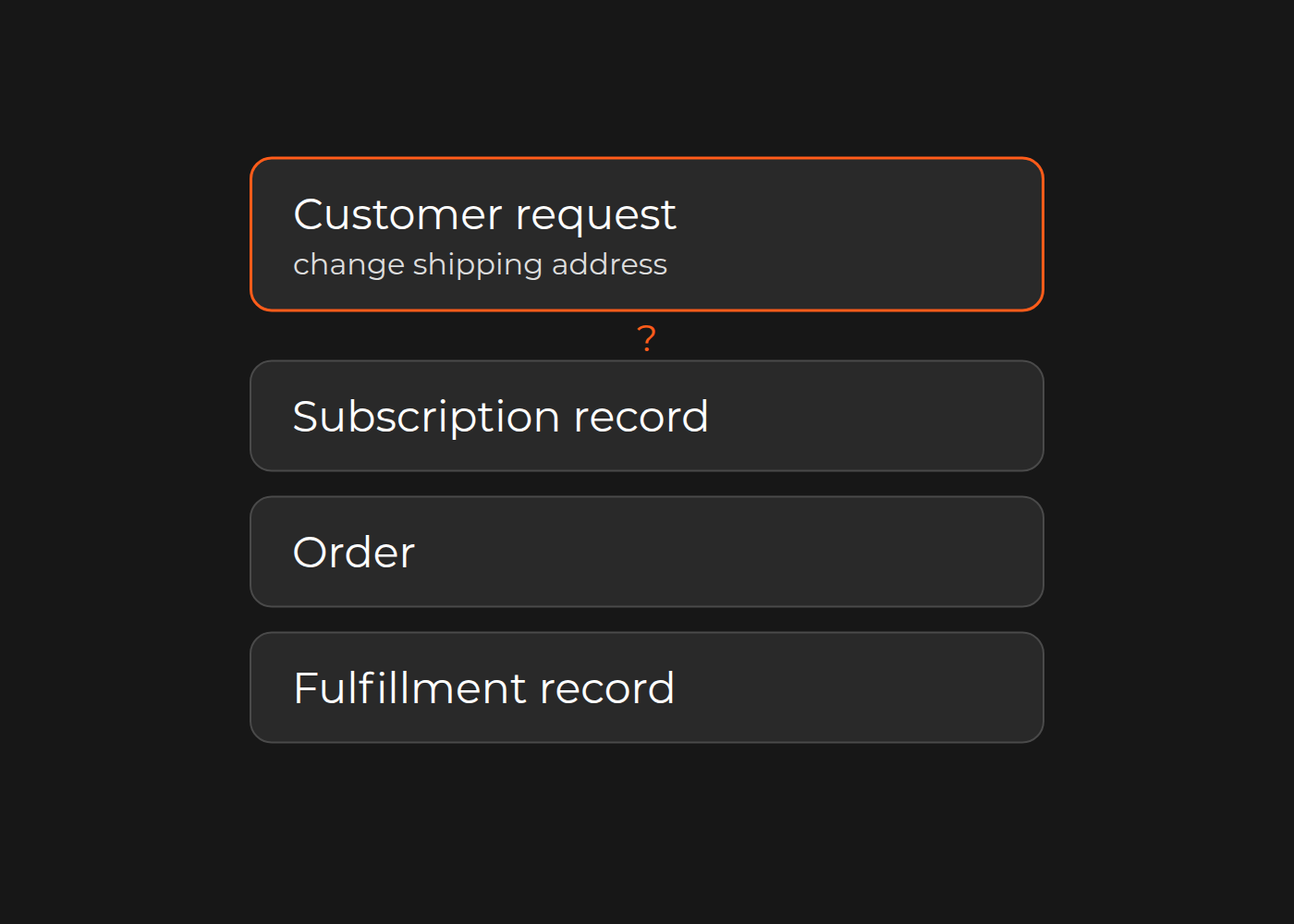

Scaling subscription management means removing avoidable reasons for customers to contact support—not simply adding a self-service screen. Start with the requests your team handles by hand: changing a shipping address, skipping a delivery, or pausing a subscription.
Check four areas: access, capability, scope and records. A customer may be unable to sign in, unable to find a supported action, unclear about which delivery will change, or seeing a value that differs from the order. Each calls for a different response. Use one recurring request to establish which response is worth testing before adding another app or commissioning custom work.
Find the obstacle before choosing the fix
These are four places to investigate, not a mandatory sequence or a diagnosis of your store.
Access: customers cannot reach the subscription controls
Capture the entry route, time and visible error. Can the customer reach the right account and subscription through the intended sign-in or account-recovery route? The portal owner can check the relevant settings and authorized evidence.
If access is the demonstrated obstacle, repair that route and make the entry point clear. Adding an address-change feature will not remove a contact caused by a failed login. Conversely, a successful login says nothing yet about whether an address change works.
Capability: the customer cannot make the expected change
Check the actual subscription app, plan and settings. Does this customer portal support “change shipping address,” “skip a delivery,” or “pause or cancel” for the arrangement the customer has? Merchant controls and customer controls may differ.
If an existing action is available but disabled or hard to find, configuration or clearer guidance may be enough. If the action is not offered, state that clearly and give customers an accurate route for requesting it. Consider development only after defining the missing behavior and checking the current provider's capabilities.
Scope: the customer means a different delivery
“Use my new address” needs a target. Does it mean future renewals, the next delivery, or an existing order that has already been billed? Show the affected delivery and effective date before confirmation, using the rules your business can actually support.
One request can touch the subscription, billing, an order, fulfillment and a confirmation email. Name the intended effect at each relevant boundary. A confirmation email alone does not prove that the shipment changed.
Shopify provides a concrete prepaid example. Its documentation on syncing orders and subscriptions states that changing a prepaid subscription's address in an app does not automatically update the associated order. The same section distinguishes subscription-contract information for items not yet billed from Order and FulfillmentOrder information for billed items.
That distinction is specific to Shopify's documented prepaid behavior. It does not supply your delivery cutoff or authorize an edit; Shopify also says admin order editing is unsupported for prepaid subscription orders. The practical question is which delivery the customer is changing and which records govern it.
Records: the portal and order disagree
Ask the technical owner which record should hold the address for the intended delivery and how the other relevant records use it. Compare linked records, noting when each was read. Different values at different read times establish a difference, not its cause.
If the requirement calls for both records to change, investigate the specific gap. A display issue, configuration problem or integration defect needs different work. Verify the corrected behavior against the target order and fulfillment information rather than closing the issue because the portal says “saved.”
Map one manual address change
Choose a request type that appears repeatedly in your support records and for which you can identify the customer's intent and target delivery. Record the manual steps once, in plain language. Keep personal and payment details out of the shared map; use tokenized record references and retain supporting evidence in your authorized store.
The following is a fictional worked example, not a merchant result or a tested update path. Address A and address B represent different addresses. “Subscription record” means Shopify SubscriptionContract; “fulfillment record” means FulfillmentOrder, not a delivered parcel.
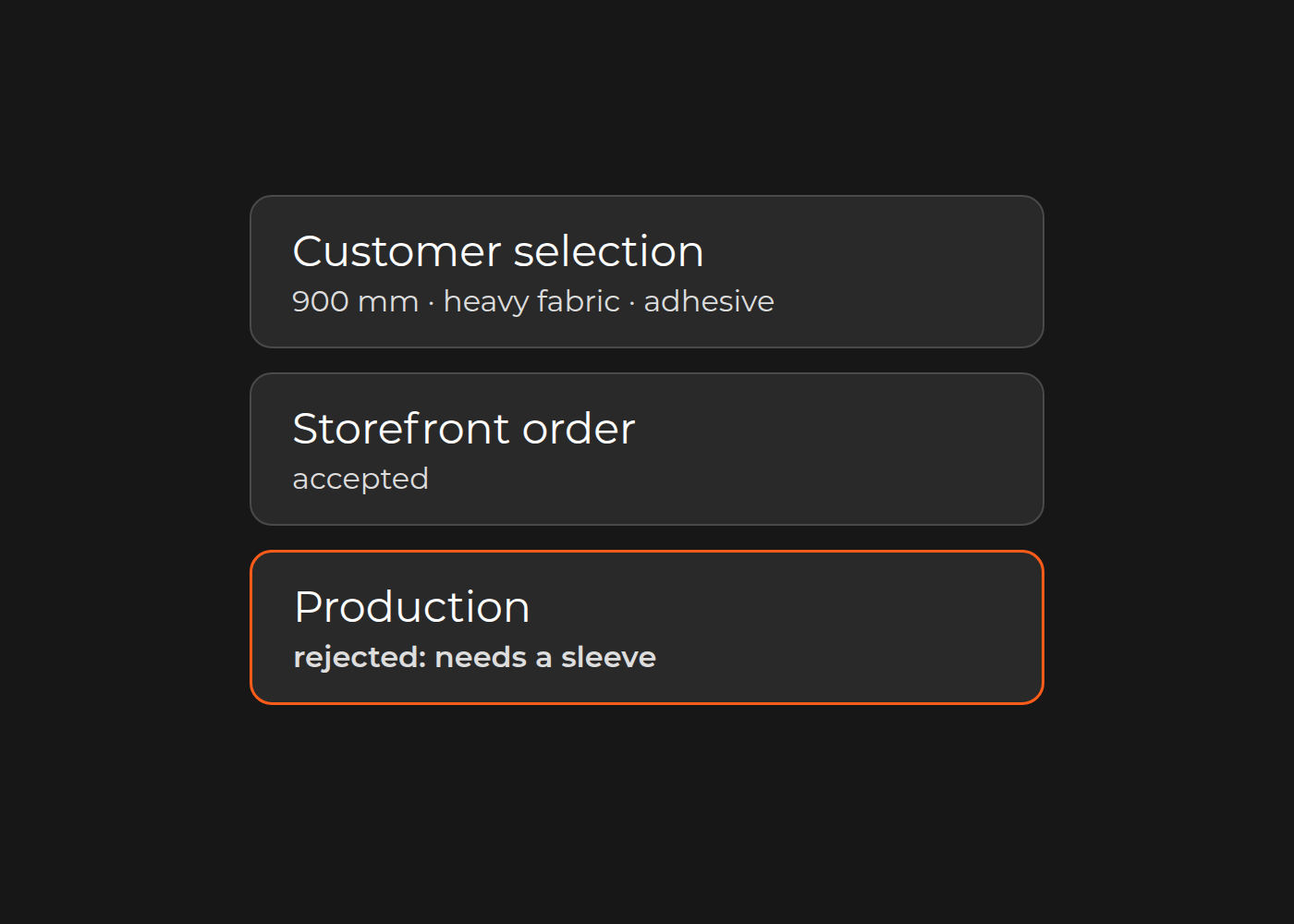
Request and target. At 10:00 UTC, a customer asks to use address B for an existing, already-billed prepaid delivery—not just a future renewal. The applicable address-change rule is still unknown.
What the systems show. Separate reads show portal B at 10:00, subscription record B at 10:02, order A at 10:03 and fulfillment record A at 10:04. Supporting evidence links the subscription, order and fulfillment records; the portal's link remains unconfirmed.
Fictional example; not a merchant result. The cards show observations, not an update sequence.
Manual work. Support records an order-address action at 10:10. The order shows B at 10:11. There is no later fulfillment read or delivery outcome, so the map cannot establish that the action corrected delivery. A fictional register contains another address request and manual action on the previous day; this illustrates recurrence, not a measured rate or cost.
Question for the technical owner. Using only already-authorized reads, can the responsible technical owner identify which address the existing Order and FulfillmentOrder are required to use for this already-billed delivery?
For your own map, separate observations, possible explanations and missing information. Keep request, read and action times distinct, including the timezone. An empty search means “not found here,” not “does not exist.” If all you have is “support fixed it,” the first task is to establish what changed.
Turn the finding into less manual work
The fix should address the obstacle you found: restore access, expose an existing capability, clarify the affected delivery, or correct a verified records problem. Agree who implements the change, who checks its business effect and who owns exceptions afterward. An acceptable workaround may remain the right choice for an uncommon or expensive-to-automate request.
To judge whether the change helps, use a consistent request category and observation period. Compare how often that request still reaches support and which manual steps remain. Keep subscriber or order growth in view when comparing periods; raw ticket counts alone cannot show whether the process improved. This is a measurement approach, not a savings or unchanged-headcount promise.
Take one completed map to your own technical team. Include what the customer asked for, which delivery it concerned, whether it was billed, and what each relevant system showed and when. If access, record links or the governing rule are missing, make that gap the first question. Ask for permitted evidence, never credentials; do not replay or edit live requests merely to complete the map.
This page helps identify the problem. The separate subscription lifecycle comparison addresses configuration versus integration or a bounded custom build once the requirement is known.
Want a second pair of eyes on your own map? Talk to the Dinarys team about the evidence you have gathered.


Let professionals meet your challenge
Our certified specialists will find the most optimal solution for your business.