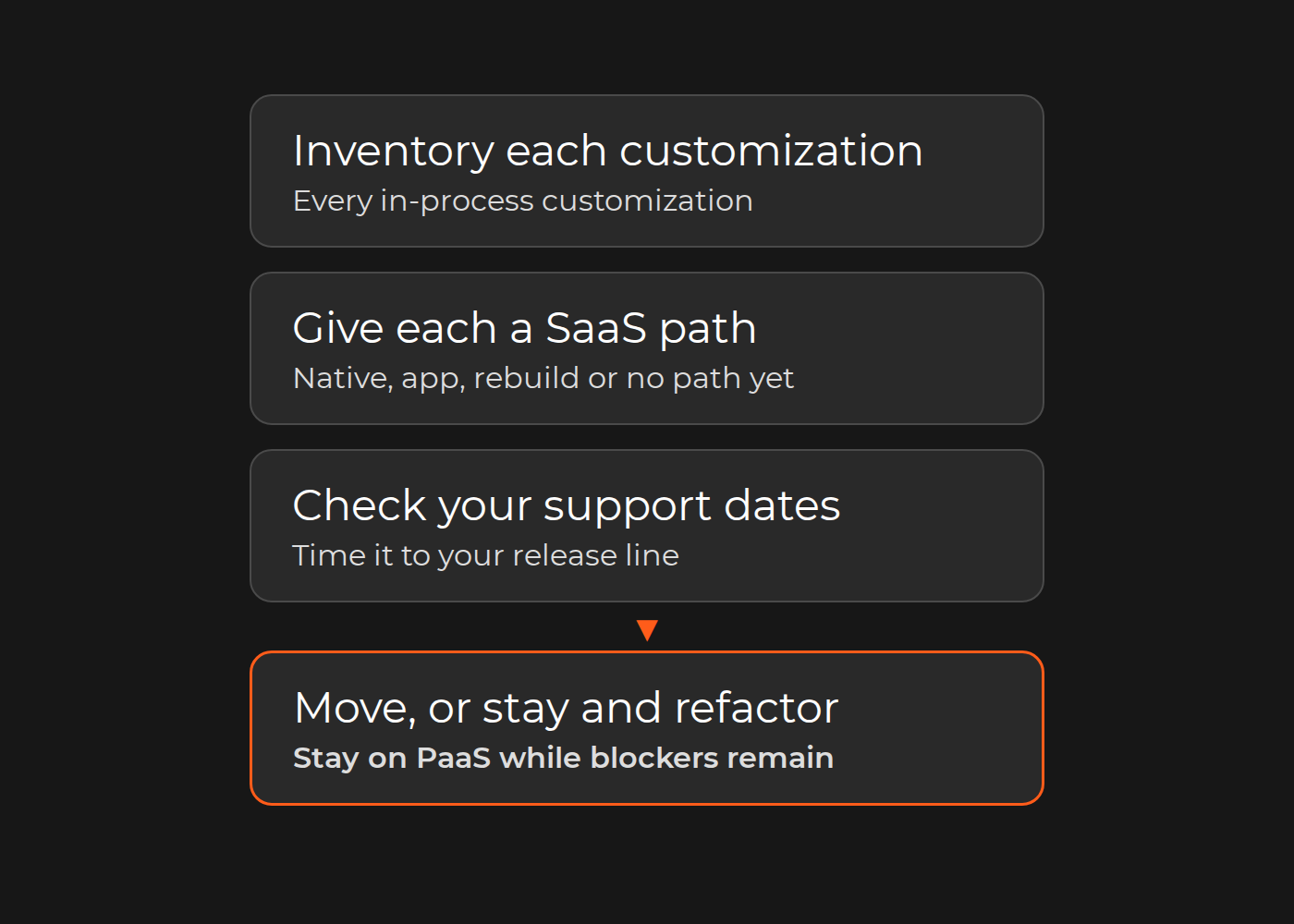
Adobe Commerce as a Cloud Service is the SaaS edition: Adobe hosts it and, in Adobe's words, "manages the core Commerce application, infrastructure, and updates". You extend it only out of process, through APIs, events, webhooks, API Mesh and App Builder applications, and you "cannot modify core application code". So the decision for a customized store turns on one inventory. List every in-process customization and give it one of four paths:
Native in the Cloud Service, so you retire your version.
An app from Adobe Exchange.
A rebuild out of process.
No path yet, which keeps the store on PaaS or forces a redesign of the requirement.
If most rows land in the first three paths, plan the move. If blockers remain, stay on Adobe Commerce on Cloud (PaaS), upgrade to a supported release and refactor out of process now, so a later move is smaller. Adobe calls the Cloud Service its "recommended long-term destination for all Adobe Commerce on Cloud customers", but its lifecycle policy also documents upgrading to a supported release as an alternative path. Time the decision to your release line's support dates.
This guide is for CTOs and platform owners with custom modules and integrations. Adobe product names, capabilities and dates below come from Adobe's documentation, checked on November 19, 2026.
What changes in the Cloud Service, and what Adobe runs for you
On PaaS, responsibility is shared: Adobe manages the hosted platform, and you manage "application-level patches, custom code, configuration" and platform services. In the Cloud Service, updates are versionless. Adobe notifies you of new releases, and "you have a 30-day period to evaluate the new capabilities in your sandbox instances" before they reach production.
Adobe's feature comparison lists the differences that decide most inventories:
Area
PaaS (Adobe Commerce on Cloud)
Cloud Service (SaaS)
Updates
"Six patch releases and one minor release per year", applied by you
"Automatically upgraded by Adobe"
Extensibility
In-process PHP and out of process
"Out-of-process only (APIs, events, App Builder)"
Data model
"Complete data model customization"
"Custom attributes for core and B2B entities"
Custom data storage
"DB, file, cache, queue"
App Builder state library (file only); database storage in early access
Search index customization
Native search customization
"Requires third-party solutions"
Emails
"Full email customization"
"Standard email templates only"
App marketplace
Magento Marketplace and Exchange
"App Builder apps from Exchange Marketplace"
B2B
"Full B2B capabilities available after installation"
"Pre-installed with core B2B features"
The Cloud Service also "does not support Luma storefronts". Its storefront runs on Edge Delivery Services.
The customization inventory and move map
Build one row per customization before anyone estimates a migration. Use these columns:
Customization and hook type: module, plugin or preference, observer, cron job, schema change, integration, Marketplace extension or theme override.
Business capability it serves, in the business's words.
What it touches: checkout, pricing, catalog or orders.
SaaS path: native, Exchange app, rebuild out of process, or no path yet.
Effort band (S, M or L), risk and decision: keep on PaaS, move, or retire.
Every in-process customization gets one of four SaaS paths. Rows that land in path 4 are the blockers that keep a store on PaaS for now.
Illustrative example (fictional): a B2B spare-parts merchant runs Adobe Commerce 2.4.7 on PaaS with 46 custom modules. Sample rows from its move map:
Customization (hook type)
Capability
Touches
SaaS path
Effort
Risk
Decision
Custom quote module (custom module)
B2B quotes
Orders
Native: core B2B quoting
S
Low
Retire at the move
Customer price plugin (plugin)
Contract prices in cart
Pricing, checkout
Rebuild: webhook and App Builder
L
High
Redesign; prototype now
Contract ID on quotes (schema change)
Quote reference
Orders
Rebuild: custom attribute on a B2B entity
M
Medium
Move with pricing
Order export to ERP (observer)
ERP order sync
Orders
Rebuild: order event and App Builder
M
Medium
Move now, on PaaS
PIM product import (integration)
Product data
Catalog
Rebuild: App Builder and REST API
S
Low
Move now, on PaaS
Custom email types (Marketplace extension)
Approval and dispatch emails
Orders
No path yet: standard email templates only
M
High
Blocker; redesign the requirement
Order grid columns (custom module)
Admin view
None
Admin UI SDK, if still needed
S
Low
Retire
Fitment table on product page (theme override)
Product page
Catalog
Storefront block
M
Medium
Rebuild with the storefront
Summary of all 46 modules (the theme is planned with the storefront):
Group
Modules
SaaS path
Decision
Duplicates of native B2B features
11
Native
Retire
Integrations already event-driven
14
Rebuild: events and App Builder
Move now, on PaaS
Checkout and pricing customizations
9
Rebuild after redesign: webhooks
Redesign first
Marketplace extensions with no SaaS version
6
No path yet
Blockers
Admin grid tweaks
6
Admin UI SDK, if needed
Drop
Total
46
Decision: stay on PaaS through the next upgrade, move the 14 integrations out of process now, prototype one pricing webhook, and ask the six extension vendors about Exchange apps. On 2.4.7, Adobe's table shows standard support to May 31, 2027 and extended support to May 31, 2028, so that window exists.
Adobe offers a Migration Assessment Tool that inventories "custom modules, third-party extensions, integrations", schema and custom tables, and maps each capability to "default capabilities, App Builder applications, or Adobe services". Use it, but keep your own map: the owner, risk and decision columns are business calls.
Map each customization to an out-of-process path
Asynchronous integrations (orders to an ERP, product imports) move to Adobe I/O Events and App Builder. Adobe's example is an App Builder app that receives an order event, reads the order through the API and pushes it to the ERP.
Synchronous logic that must answer before checkout continues uses webhooks. Adobe says synchronous calls are needed "when Commerce needs to compute or validate something immediately (order totals, taxes, payments)", and advises using a webhook "only if synchronous communication with the external server is critical". Its checkout starter kit provides apps for payment, shipping, tax and totals.
Combined APIs go through API Mesh, which combines sources "into a single, queryable GraphQL endpoint".
Admin changes use the Admin UI SDK.
Custom tables are the hard rows. Adobe notes that implementations needing long-term storage "may need to provision and maintain additional infrastructure", and its data migration service "supports first-party core commerce data only".
Much of this works on PaaS today: Adobe's comparison lists out-of-process extensibility as recommended there too. Confirm App Builder access under your PaaS contract with Adobe; its documentation sends licensing questions to its FAQ or Adobe Sales.
Three options: stay on PaaS, move to the Cloud Service, or replatform
Stay on PaaS while blockers remain. You keep patching and upgrading: Adobe says the upgrade path "does not eliminate future upgrade obligations". Our Magento 2 upgrade services cover that path, and Adobe Commerce development covers the custom modules you keep on PaaS; for what the PaaS edition includes, see Adobe Commerce Cloud explained.
Move to the Cloud Service when the map shows few blockers and your team, or a partner, can build and run App Builder applications.
Replatform when the map shows that most value sits in custom code that would need rebuilding anyway; compare that with repair or replatform costs. If you run Magento Open Source, Adobe's migration guide is written for Adobe Commerce on Cloud and on-premises, so your question is an upgrade, an Adobe Commerce license or a replatform; see Magento editions compared.
Write down why each rejected option was rejected. For Prostor's Magento 2 migration, the case page records what Dinarys ruled out: performance patching and custom extensions on the existing platform, because the constraints were architectural; a headless frontend over the existing backend, because the urgent problems were not presentation; and deferring omnichannel to a second phase, because unifying the loyalty program and pickup module later would need more rework.
Frontend implications: Luma, Hyvä or PWA versus the Cloud Service storefront
Adobe's migration guide says storefronts "are rebuilt on Edge Delivery Services" and that storefront modernization "is not just a UI migration". Hyvä describes its theme as using "the PHP-templating system built into Magento", so treat a Hyvä storefront, like Luma, as a rebuild. While you stay on PaaS, Adobe's Luma Bridge, a PHP module for PaaS, shares cart and sign-in sessions so a theme-based storefront can move to Edge Delivery Services in phases. Adobe says it is not suitable for a headless storefront such as PWA Studio. Luma Bridge relies on Adobe's sign-in and cart drop-ins, and drop-ins on PaaS need an Adobe Commerce Optimizer license. Run the storefront as its own workstream with its own acceptance tests.
Timing: version support windows and upgrade cycles
Adobe gives each release "a three-year standard support window from the General Availability (GA) date". Starting June 1, 2027, it "will no longer maintain Cloud environments running unsupported Commerce versions", up to suspending traffic. On Cloud (PaaS), before the end of extended support for your release line, you "must move to a supported Adobe Commerce version or migrate to Adobe Commerce as a Cloud Service". The move pays off when it replaces an upgrade you would otherwise run and your blockers are resolved. On 2.4.6 or older, settle the support deadline first: in Adobe's table, 2.4.6 extended support ends August 31, 2027, and 2.4.4 and 2.4.5 are in a security-only period that ends May 31, 2027, with Cloud enforcement from June 1, 2027.
A phased plan and its acceptance criteria
Inventory and assess. Build the move map and run Adobe's assessment. Accepted when every customization has a path, an owner and a decision.
Refactor on PaaS. Move integrations out of process and retire duplicates. Accepted when a sample of orders produces the same ERP messages before and after, and the old module is disabled with a rollback plan.
Redesign checkout and pricing. Accepted when totals, tax and shipping match on an agreed set of baskets. Adobe's out-of-process tax module replaces the core tax class through a preference and is incompatible with extensions that override the same class, so check conflicts first.
Cut over and operate. Accepted when your regression suite runs on the sandbox within each 30-day update window.
Exceptions
Magento Open Source stores are outside Adobe's migration guide.
Heavy B2B or industry data models: Adobe notes that "industry-specific customizations may require additional implementation considerations".
Several instances: consolidate before you move.
Region or compliance needs: for production regions Adobe says to contact your representative; HIPAA is "currently not available" in the Cloud Service.
Existing PWA Studio or Hyvä frontends change the storefront effort.
What our cases show
On Zebrapack, Dinarys migrated Magento 1.9 to 2.4.1, then upgraded to 2.4.6, with a custom printing module that applies uploaded designs to products with real-time visualization and a custom referral program: the kind of in-process code a move map must cover. On SpieleMax, an existing Magento 2 store, Dinarys added six extensions and built the loyalty system as a separate service integrated with Magento 2, a capability already outside the core. None of these is a Cloud Service migration; they show both kinds of work a move map classifies: in-process modules and services already outside the core.
Test your decision
Inventory your ten largest customizations and give each a SaaS path. You should be able to name the blockers that keep you on PaaS for now, or the refactoring that makes a later move smaller.
Your next step
Fill the move map for those ten rows. If you want an outside review of the code behind them before you commit, start with a Magento code audit.
FAQ
Is Adobe discontinuing Adobe Commerce on Cloud (PaaS)?
The pages we checked announce no end date for PaaS. Adobe recommends the Cloud Service as the long-term destination and documents upgrading as an alternative path.
Can I keep my PHP modules in the Cloud Service?
No. Extensibility is out of process only, and merchants cannot modify core application code.
Do I have to rebuild my storefront?
If you move, yes. The Cloud Service does not support Luma storefronts, and Adobe's guide rebuilds storefronts on Edge Delivery Services.
Can I prepare while still on PaaS?
Yes, if your contract includes App Builder access. Out-of-process extensibility is recommended on PaaS too, so integrations can move now.